

Reviewed by Younes Ezzaki
Disclaimer: This is an unbiased and independent review. Aircraft Broker Program (ABP) is not being paid or otherwise compensated for the opinions stated in this article.

If you just want the quick lunch summary, I can say that Pipeline is clearly shifting from the accessible CRM it started like, and attacking the corporate world. It starts off as quite a pricey of a CRM, but definitely has quite a lot of value. Starting at $24/seat/mo, that price makes sense to a certain degree, but that means the cost for scaling up and adding features goes up quite fast. You'll very soon find yourself going to the Growth Plan at more than double the price at $49/seat/month.
The interface itself is incredibly user-friendly unlike other CRMs out there, which will be a major advantage for newcomers. After working with more than 10 different CRMs in my career, Pipedrive interface is by far the best experience I had, with minimal clicks needed to get things done.
The setup is a breeze, making transitions from other systems not as hard as one might think, but be aware of contact limits. Pipedrive offers from 2,500 to 20,000 contacts per seat. I really wished they sticked to a "no contact limit" approach. That wouldn't be an issue for most starting brokers though.
Pipedrive gives you a free trial for 14 days under their Ultimate plan, which is a smart way to get you hooked, so make sure you understand what features become add-ons when the trial finishes.
Here is a no non-sense, unbiased review of Pipedrive. Let's take a look:
What I Like.
1. How Leads are Organized: Score 9/10
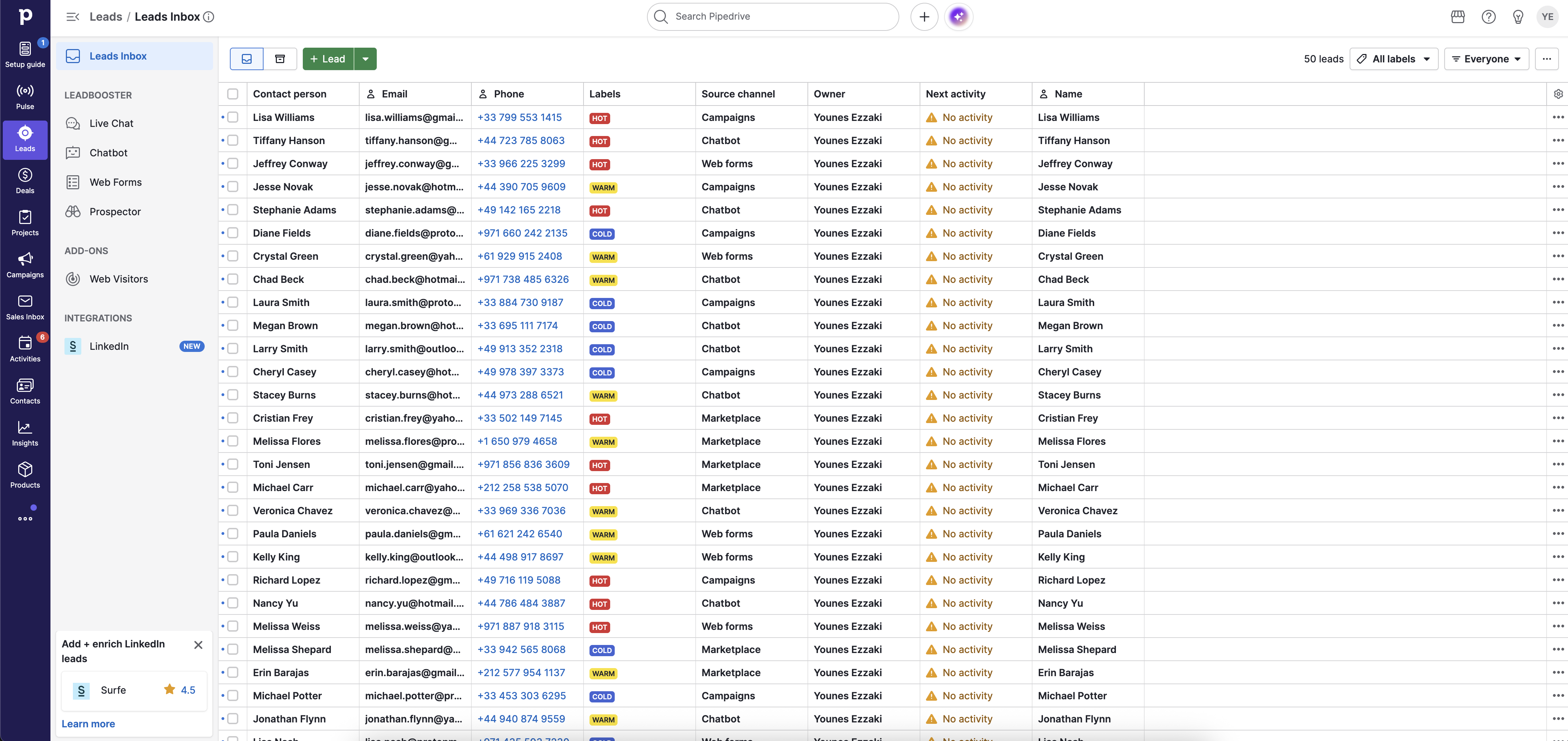
I've been in jewelry sales, real estate, and private aviation, and in my experience, every successful sales career starts with lead management. In Pipedrive, the "Leads" tab works as your staging area. This is where every prospect lives before you turn them into a formal "deal."
To be fair most CRMs will have a dedicated "leads" tab, but one of the features I find most effective within this module is the use of labels. Love it! I can categorize prospects as "Hot," "Warm," or "Cold." In reality, not every lead deserves equal attention. A "Hot" lead is someone with an immediate buying signal or a concrete mission requirement. In my book, that takes the lead at the top of the shelf.
It literally takes 2 clicks to assign a label. Awesome!
With that, Pipedrive allows you to use bulk actions, such as sending a group email to all "Warm" leads to check in on their summer travel plans, empty legs, or industry announcements, and really making sure that you stay top of mind for them.
2. Email Follow-Ups: Score 9/10
Outreach in private aviation requires a delicate balance of persistence and professionalism. Send too many email, and you and your domain will get a private jet to spamland. Those are usually one-way trips. Send too few, and you lose deals. Making sure your emails are targeted is paramount. Pipedrive shines in that aspect.
a.Built-in Email Tracking & Integration
One of the standout features for me is real-time email tracking and integration with popular email tools. I use Outlook, and as a ZohoCRM user for the most part, the process was suspiciously simple. You just select your email provider, enter your credentials, and voilà. Do not however that if you use your company email, you may be asked for admin permission.
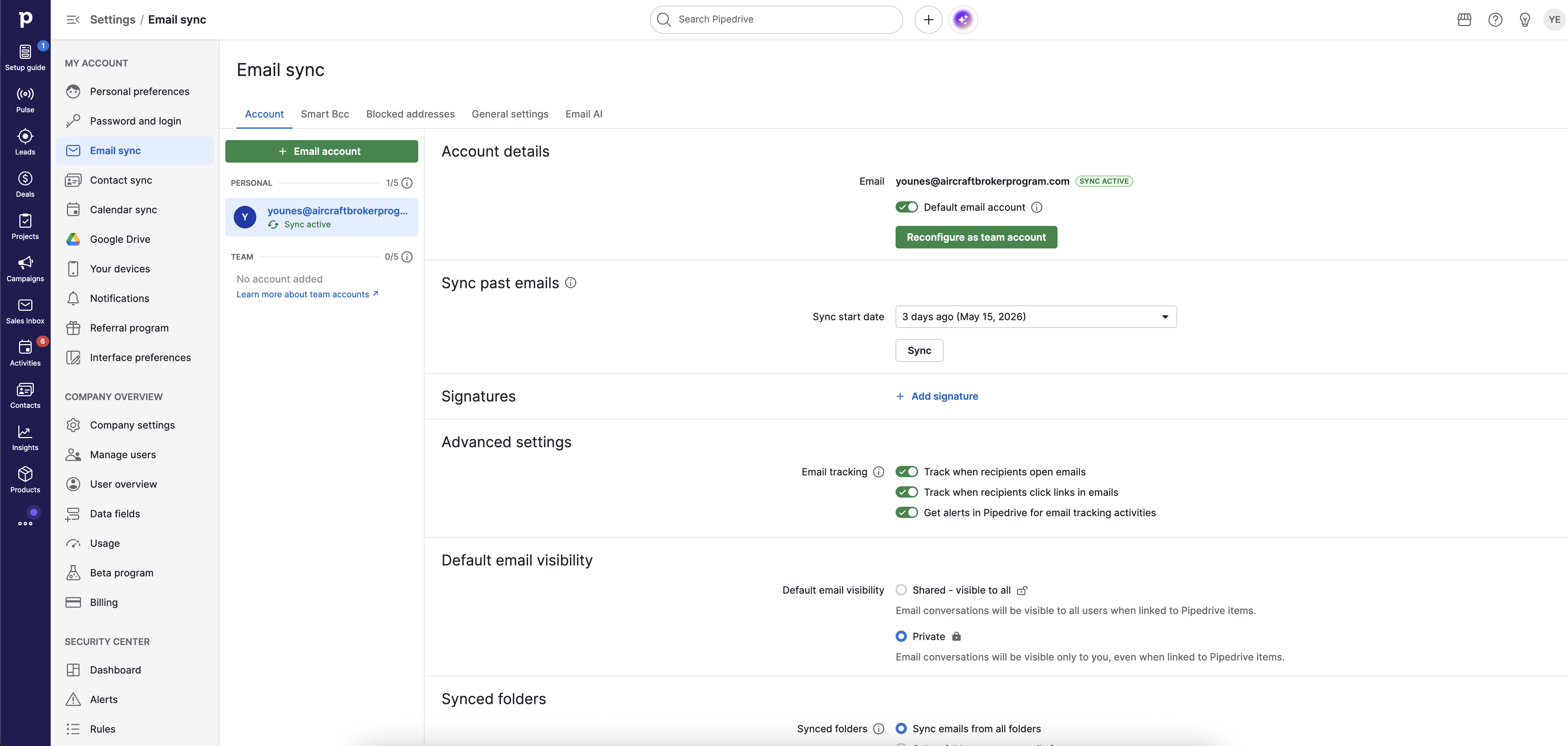
Email tracking is also very useful. I had this at every stage, and I can't live without it today either. Knowing if your client actually bothers opening your emails and clicking on any links, to me is a signal of genuine interest. Sure, it's not proof, but it's a variable among many others. When I send a quote, Pipedrive notifies me the moment the recipient opens it. Just make sure that option is turned on in your email settings.

There's a few caveats to that you definitely should be aware of.
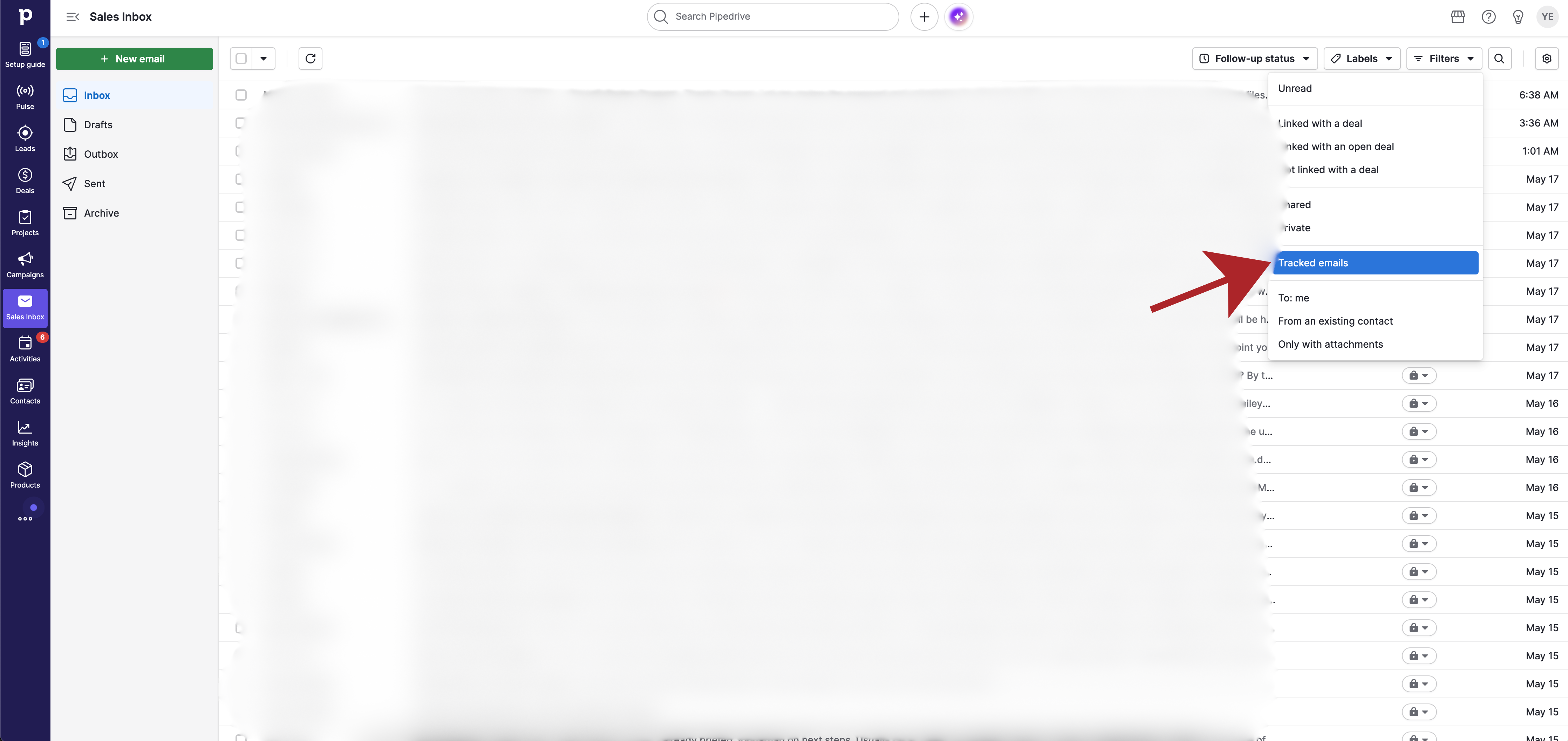
#1 is that you need to stick to sending emails from Pipedrive email inbox if you want the tracking system to work. Sending emails from Outlook directly won't have tracking capability synced. If you ever find yourself in that situation, you can filter by "Tracked Emails" to see which emails are tracked.
#2 is that mail “opens” are no longer always a reliable metric, particularly for users of Apple Mail. With Mail Privacy Protection (MPP), Apple may automatically preload tracking pixels in the background, causing an email to register as “opened” even if the recipient never actually read it. As a result, open rates should be treated as directional indicators rather than definitive proof of engagement. On top of that, if someone opens the email and doesn't "load the images", the open tracker won't register. So take this feature with a grain of salt. But to be fair, this applies to any CRM out there. To know which emails are tracked, you can filter them in.
Real shame all of this is only available on the Growth Plan and above. That's going to set you back about $50/seat/month. Ouch...
b.Templates
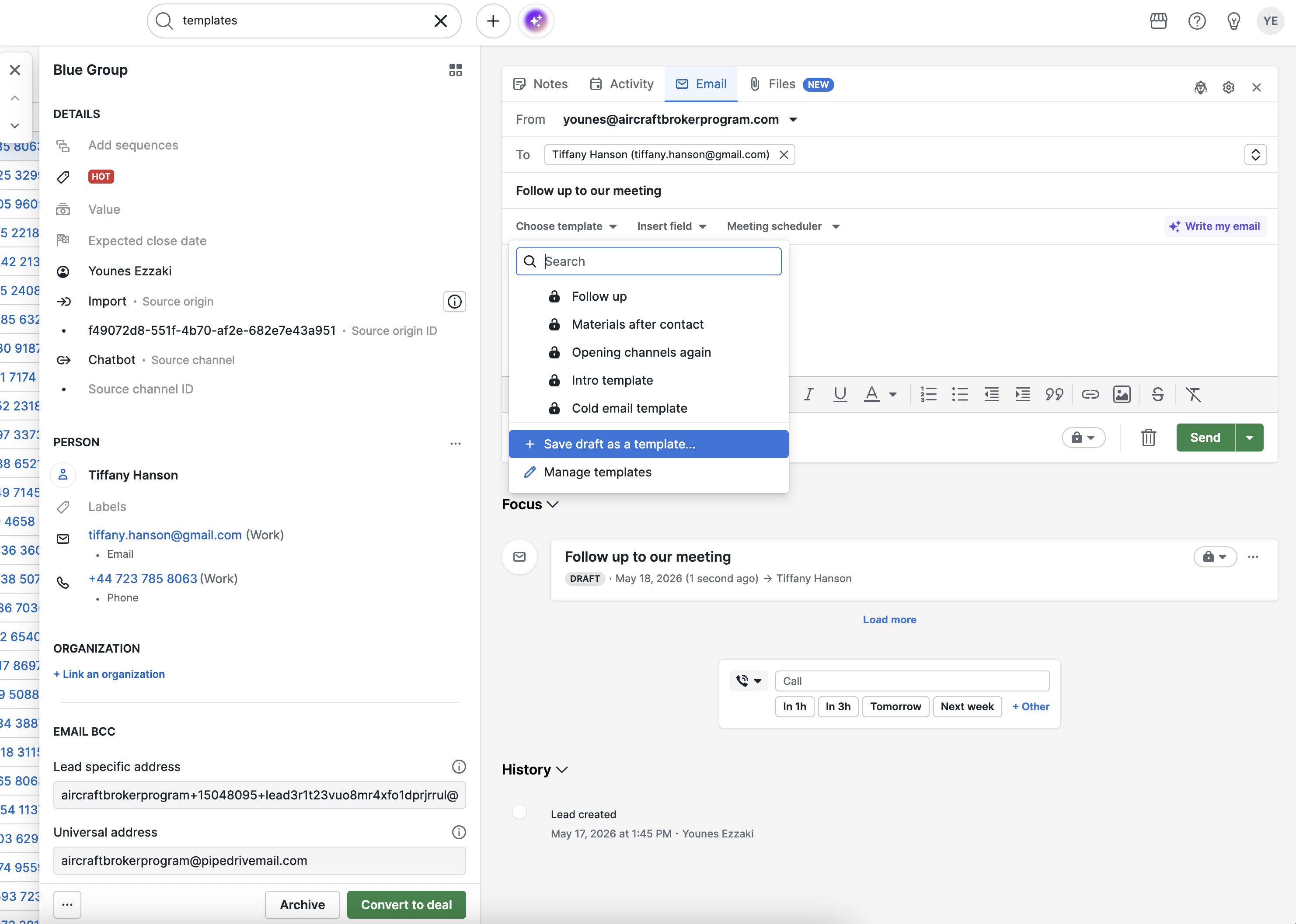
Again, most CRMs have this, but I've rarely seen a simpler way to do it. You can edit, create, and send email templates straight from the leads tab. You can just click on your lead or contact, and hit the Email tab. In there you'll see the option of either selecting an existing template, or create a new one and save right away. Very useful for things like sending quotes, welcome emails, or just the usual nurture emails. Superb.
3. Activity Management: Score 8/10
A common myth I see in this industry is that successful brokers rely on "luck" or "connections." In technical reality, I believe they rely on consistency.
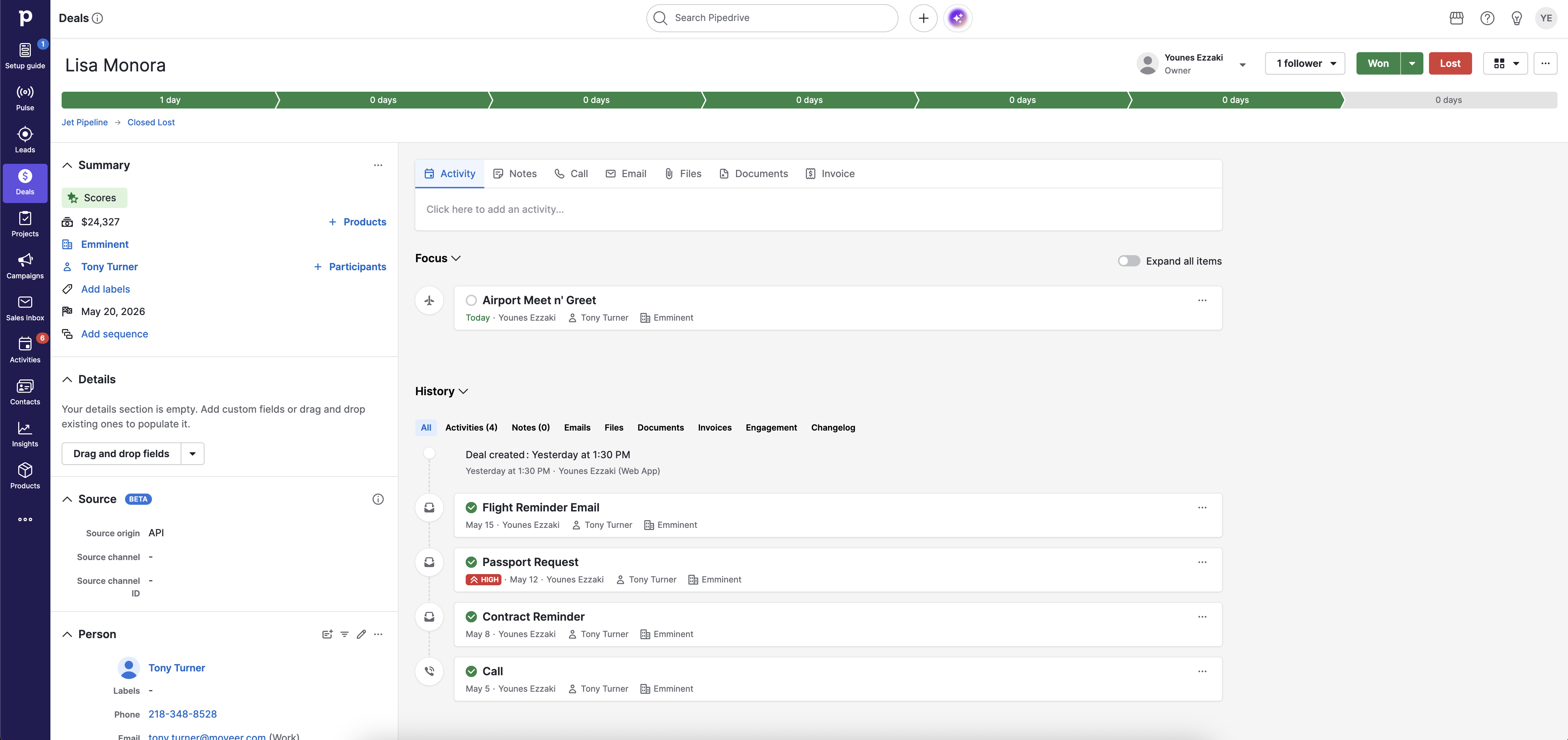
I honestly think that Pipedrive has an excellent way of listing all of your activities. You're sent reminder on tasks due or overdue, and shows the exact trail of activities for any contact or deal. The other cool thing is that you can add type of activities to suit your business needs and style. For example I've added a specific activity type for "Airport Meet n' Greet". Once you mark that activity as completed, Pipedrive automatically prompts you to enter the next activity to make sure there's always something to do on that lead to make sure they never fall off a cliff.
The only reason why I didn't give it a 9/10 is because the pipeline stages are missing at the top. I looked around to see where I can add the title to make sure it's clearly visible, but had some trouble. It's a basic thing to have..
4. The Deal Pipeline: Score 9/10
You may think my favorite thing about the pipeline management is how easy it is to manage. No. Most CRMs have this pipeline part figured out so I'll go straight to what's different here.
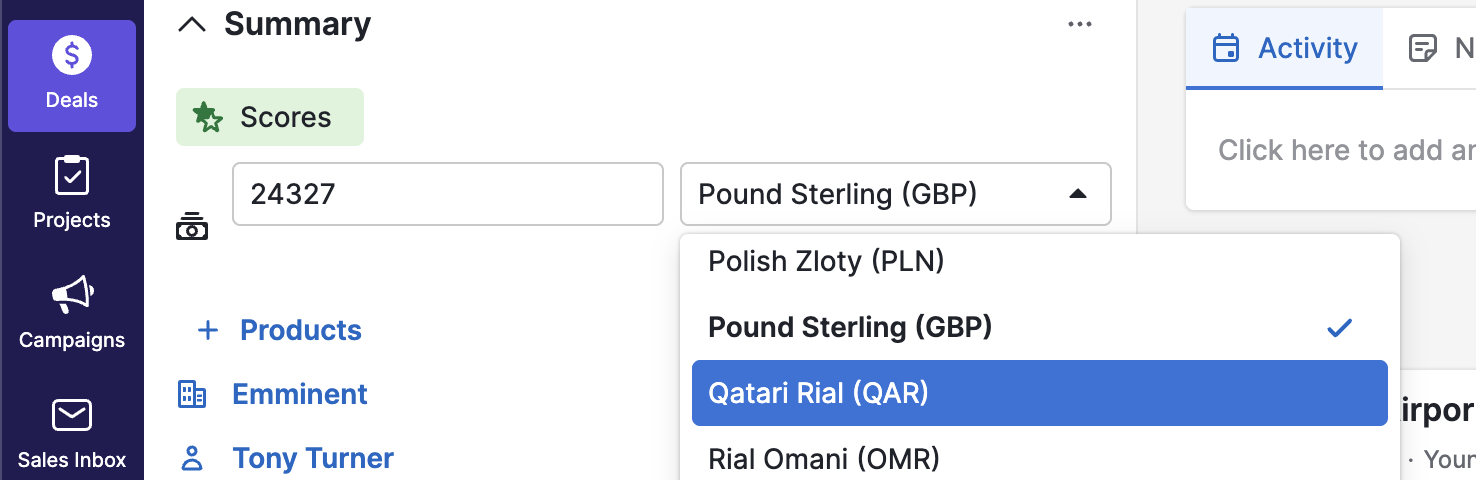
My favorite thing is that you can have deals in multiple currencies! Absolutely love this!
Most, if not all CRMs, will ask you to pick between the Soviet Deutschmark and Grain Seeds and stick to that. Pipedrive let's you pick the currency for each deal. This is amazing for a jet broker, because you often deal with contracts in different currencies. You'll have deals in EUR, GBP, USD, AED... and other CRMs make you go through the headache of having to convert currencies to your chosen CRM currency before punching in the details. But wait, I already here you asking Does it convert? Yes it does....
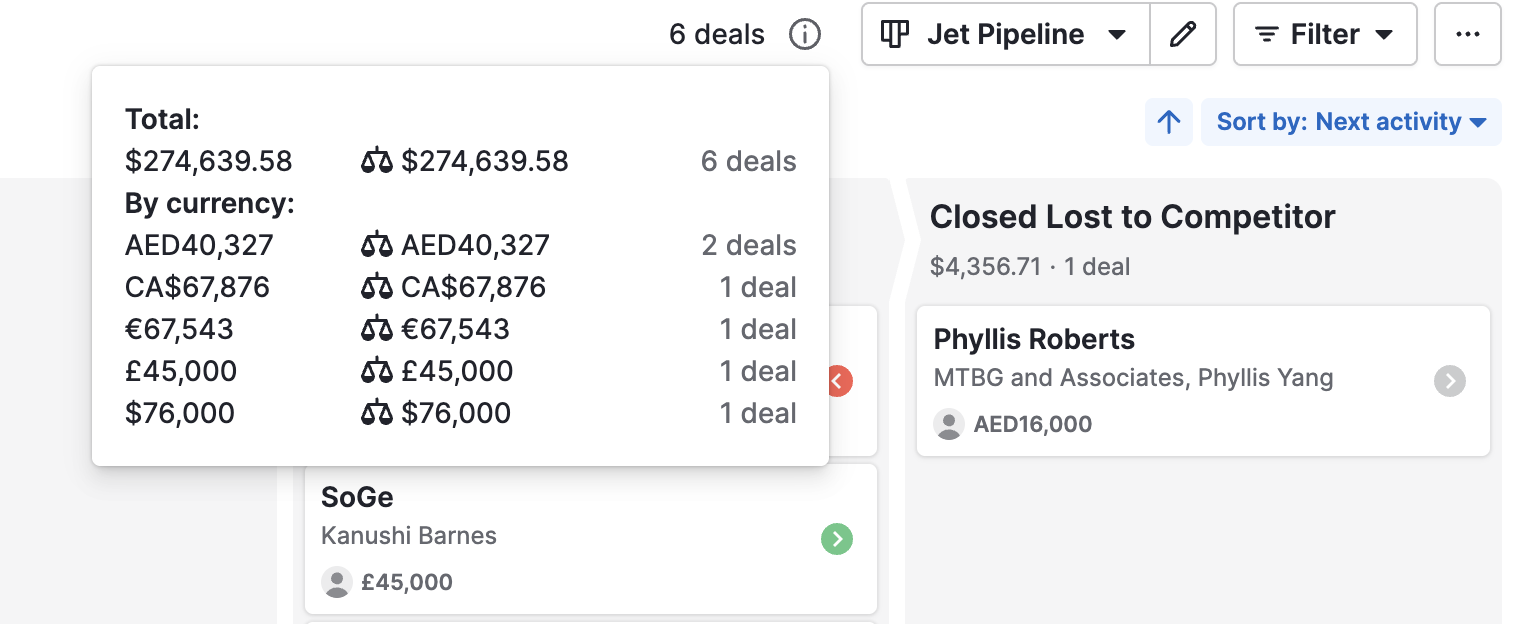
When you go back to your pipeline, all deals are converted to your account chosen currency (USD for my case), and gives you a summary. This to me is an incredibly invaluable feature.
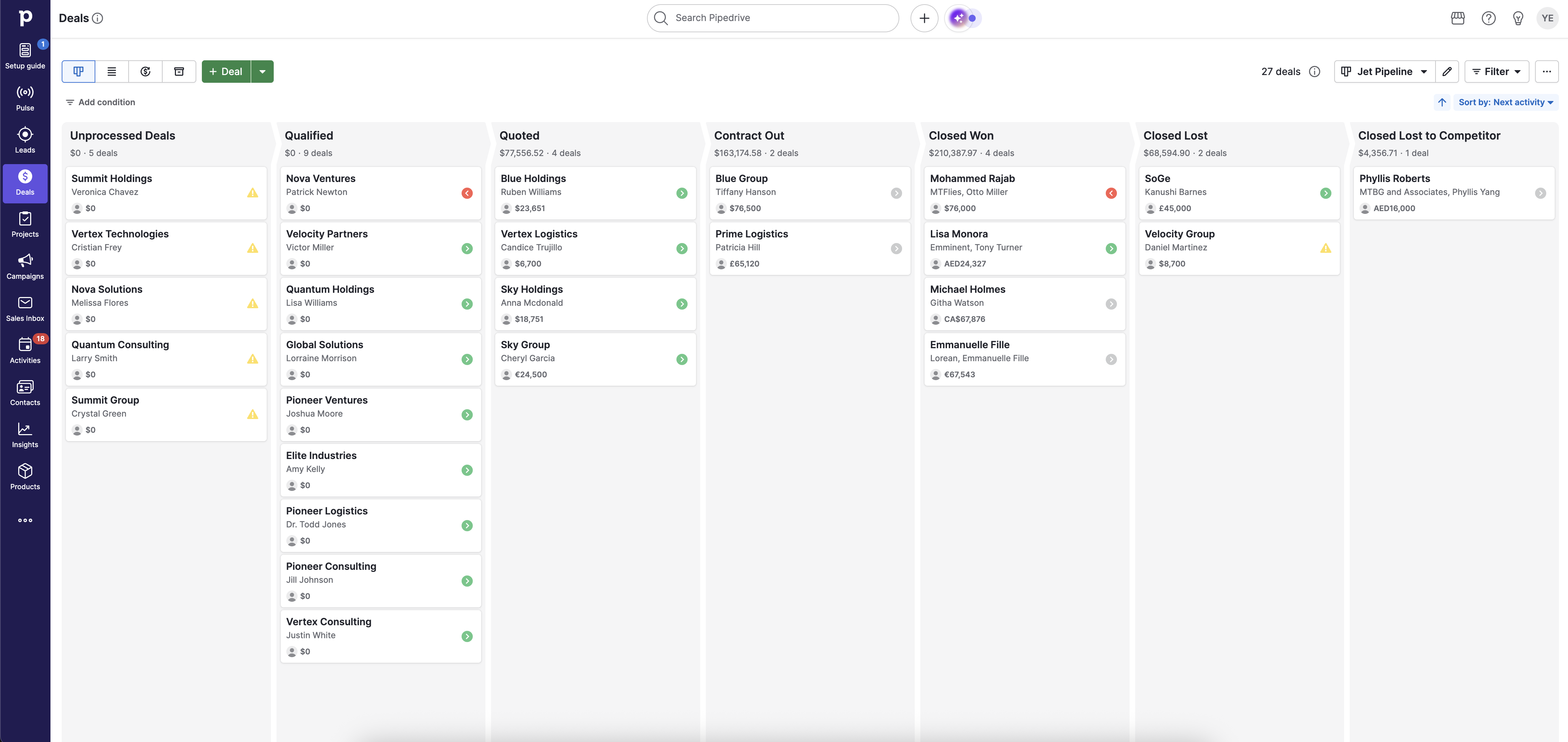
I almost gave it a 10/10 here, but the only reason why I havn't is because you can't change the colour of each pipeline to make them easy to spot and focus, at least not natively. For example I like to have my Qualified leads in blue, Qualified in purple, Quoted and Contract Out in Purple, Closed Won in Green, and Closed Lost & Competitor in Red. Can't do that here.
I also like the forecasting feature to some degree. If I know I have $500,000 worth of deals in the "Proposal" stage and my historical close rate is 20%, I can realistically project $100,000 in upcoming revenue. This allows me to plan more effectively and manage the "feast or famine" cycle that often comes with high-ticket sales.
5. Merging Duplicates: 10/10
I've always believed a clean database is essential for brokers. If my CRM is cluttered with duplicate contacts, I risk double-calling the same client, splitting important notes across records, or missing context at the worst possible time.
Pipedrive has a dedicated Merge Duplicates tool under Tools and apps. I can also merge directly from a contact’s detail view if Pipedrive flags a possible duplicate.
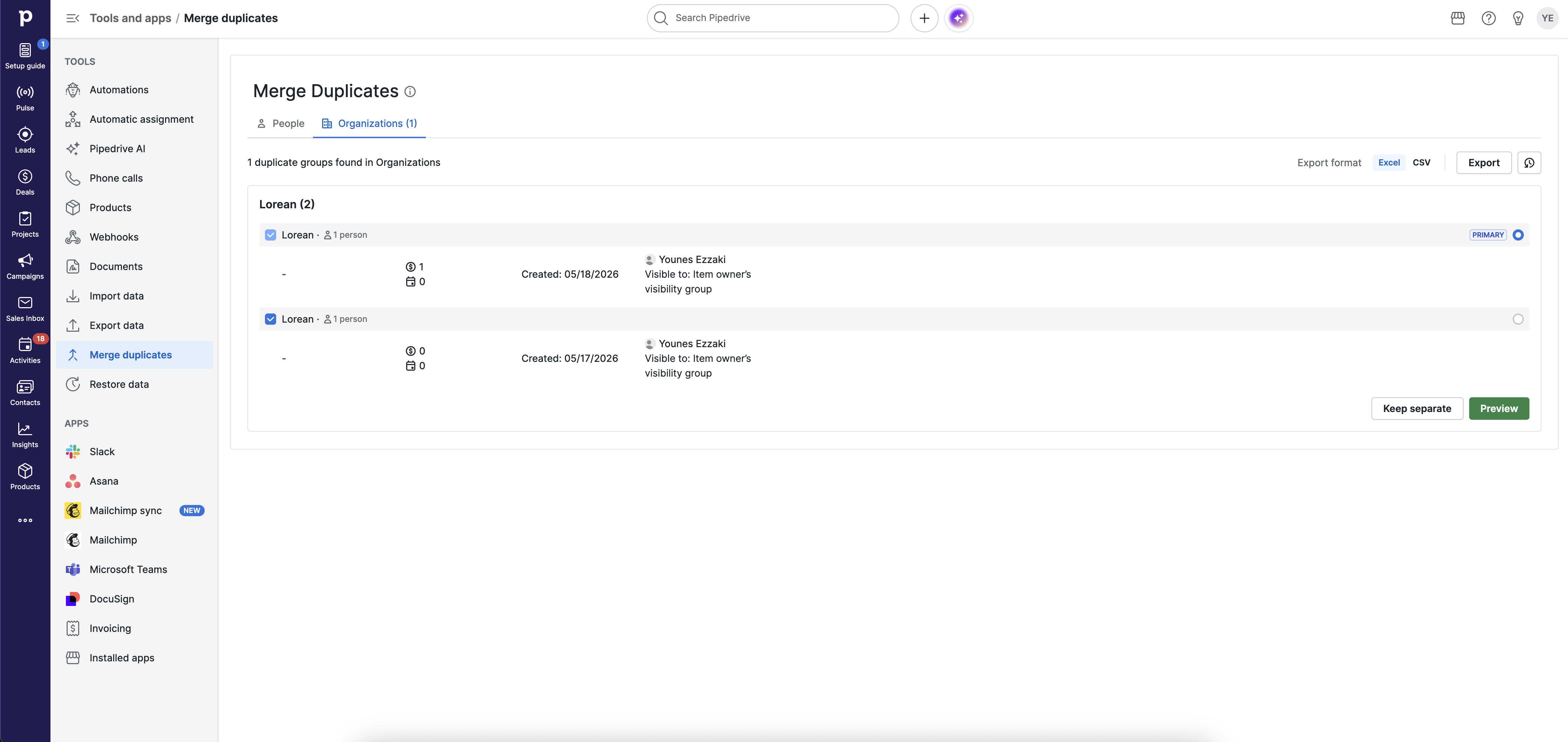
When I merge, I choose a Primary contact. That record takes precedence, so I need to pay attention to what data is being preserved and what is being folded into it. Pipedrive also detects duplicates when you create a new contact or organization. Superb!
Important note though. Merging is permanent and cannot be undone, so I always recommend double-checking that preview before confirming anything.
6. Automations: 7/10
One big bummer right off the bat is that automations are only available in the Growth Plan and above. I do recommend considering such feature, I'm just not sure if I'm willing to shell that amount of cash for it though..
I see Pipedrive’s automation features as a practical way to eliminate the "busy work" that eats up my day. But in private aviation, automation is not just about convenience. It is about speed.
My standard is acknowledging a lead within 2 minutes. If a prospect submits an inquiry for a charter or an acquisition request, I do not want to discover it 20 minutes later because I was buried in email. I need the CRM to ping me immediately, and Pipedrive lets me set that up properly. 120 seconds is just an obsession for me, and I really need a tool that helps me achieve that.
You can configure it to notify you through Microsoft Teams, Slack, or even Asana, and in my experience it works perfectly. With this, I've had leads ask me how I was able to respond so quickly, and one even asked if I was an AI. Nope, I'm just very quick.
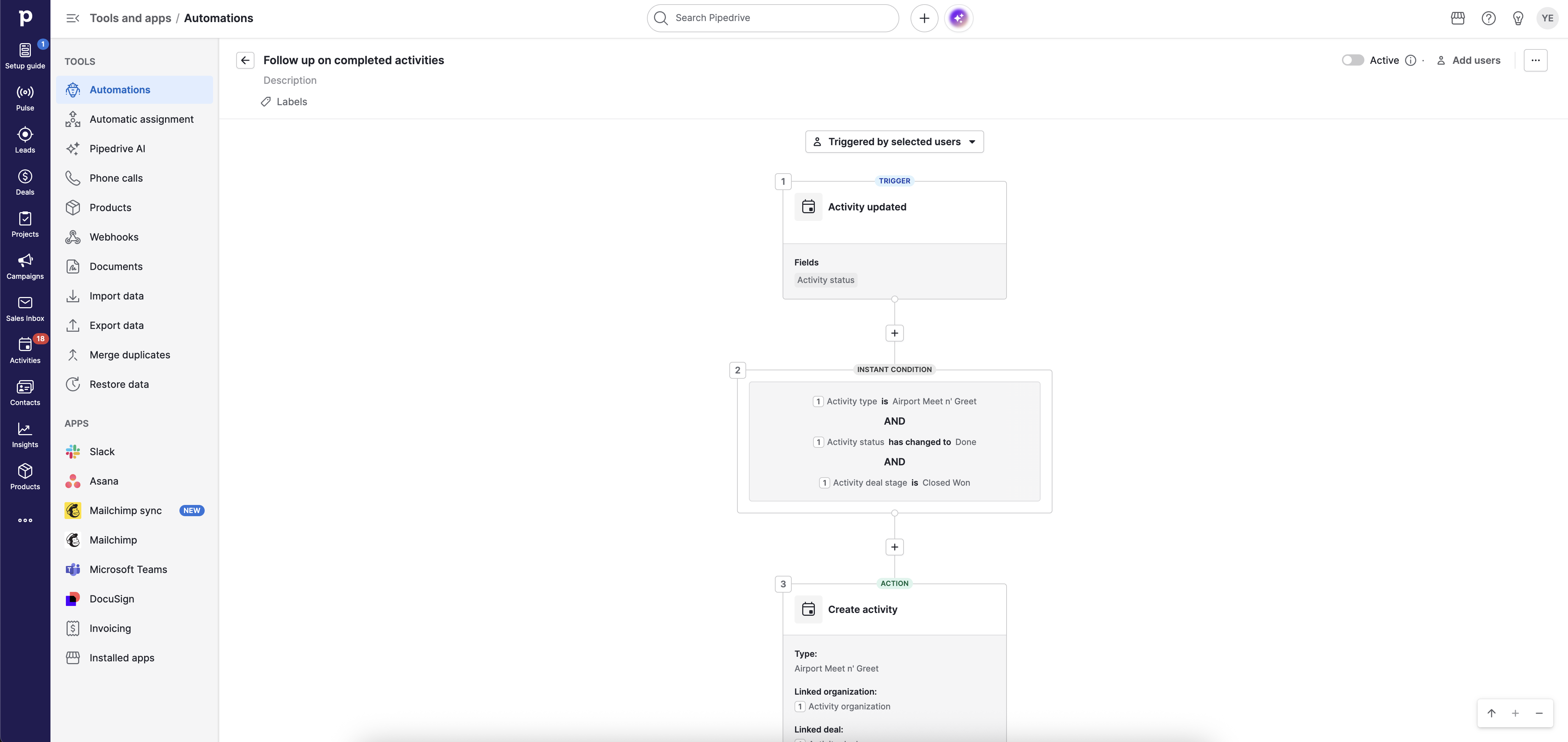
Why did I give it 7/10 if it's good. Well, I believe this sort of feature should be included in any CRM. All these CRMs out there are releasing more and more advanced features, but hide them behind a paywall, turning them into glorified phonebooks.
7. App Integrations: Expanding Your Toolbox
CRMs are increasingly become less of independent islands, and become able to connect with your other tools. The issue you'll find with most systems is that these kinds of features is that the list of apps is rather limited and the probability of a system being able to connect to all your other services is nearly 0.
That being said the list is pretty long here, and it's one of the longest I've seen ever. Out of the 5 other systems I use, 4 are currently supported by Pipedrive.
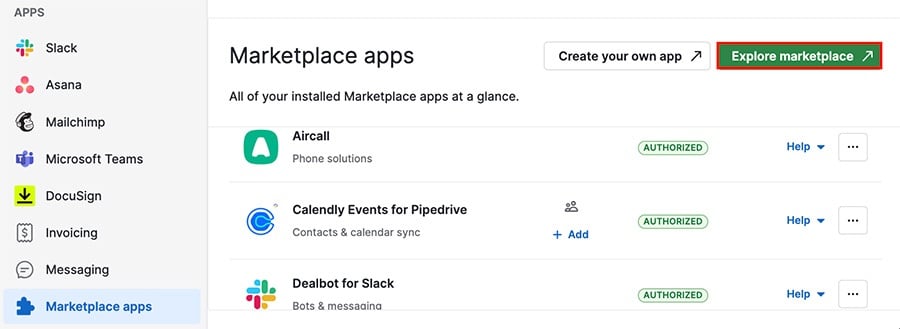
Pipedrives syncs with my Calendly, Monday.com for project management, Microsoft Teams, and QuickBooks. Very useful. Follow the link below to see the full list:
https://www.pipedrive.com/en/marketplace
What I Don't Like.
1. The Price
As a new broker, if you want to decently take advantage of what Pipedrive has to offer, you'll have to go with their Growth Plan for $50/seat/month.
Here we're not getting all the bells and whistles. You're getting the email sync function (1 Account per seat), automations, contacts timeline, automated email sequences, no phone support, 5,000 contacts per seat, and a few more things that new brokers won't necessarily care about until they grow.
With this plan, you're not even getting lead scoring, setting required field (outrageous), can't automatically assign leads, and the "security alerts". Why is security now a paid feature?...
That being said, I 100% understand some features like LeadBooster being an upgrade.
So I think the price point is quite high, especially once you start to scale. Pipedrive now positions itself amongst some of the priciest platforms out there such as Salesforce and HubSpot.
2. Limited Contacts
I long for the day where we'll have a CRM with no contact limits, or at least a lot more than what CRMs offer. Pipedrive started off as a "No Contact Limit" CRM, and I'm sad to it move away from one of the great things that made it so awesome to begin with. That being said, everyone around here is in the business of making more money, and I'm sure it makes financial sense, especially considering how far it has come.

3. Basic CRM Function Now Addons
The shocker with Pipedrive is that while its able to justify certain features being paid, I cannot comprehend why features such as "Campaigns" would need a special subscription. Email campaigns to me should an inherent part of any CRM, I find this limitation to be frustrating. Even if you decide to pay the extra $16/mo, you'll only have a 1,000 subscriber limit, and there are no campaign insights. If you want insights (which you do), it'll cost you $24/mo. If you want more subscribers, 5,000 subscribers will cost $63/mo, 10,000 subscribers will be $108/mo, and so on, with a maximum of 100,000.
The Verdict: Is Pipedrive Good for Jet Brokers?
It depends.
From my perspective, in terms of functionality, absolutely yes. Pipedrive is one of the most complete tools out there, but whether you think it's a good fit will depend heavily on your budget. This CRM has moved from an accessible system, to now playing with the big players.
You can start off at $24/mo with their Lite Plan, but you will very quickly find yourself frustrated to see that many basic CRM features are either an add-on (like Campaigns), or require an upgrade to the Growth Plan (like Automations).
Bottom line, if money isn't an issue, 100% yes. If you're a starting broker, or someone who isn't consistely raking in decent money, 100% no. Pipedrive now requires an important investment, and you can't really afford to play around with it till you learn.
For people who are new to CRMs, don't have decent budgets for software, or are just getting started, there are a few other alternatives out there.
Pros & Cons Summary
Pros
Best-in-class user interface: Extremely intuitive and easy to navigate, especially for newcomers to CRMs.
Fast setup and onboarding: Migrating from another CRM is surprisingly straightforward.
Excellent lead organization: Labels, filters, and bulk actions make pipeline management highly efficient.
Strong email integration: Outlook integration and built-in email tracking work very well.
Simple and effective templates: Creating and using email templates is quick and frictionless.
Great activity management: Follow-up reminders and next-step prompts help maintain consistency.
Multi-currency deal support: One of the strongest features for international brokers handling EUR, USD, GBP, AED, and more.
Accurate revenue forecasting: Useful visibility into projected pipeline revenue.
Outstanding duplicate management: One of the best merge systems available in a CRM.
Powerful automations: Real-time notifications and workflow automation improve response speed dramatically.
Large integration ecosystem: Connects with major tools like Calendly, Monday.com, Microsoft Teams, and QuickBooks.
Designed for serious sales operations: Strong overall functionality for brokers managing high-ticket transactions.
Cons
Pricing escalates quickly: The real functionality begins at the Growth Plan, which becomes expensive as teams scale.
Many essential features are paywalled: Automations, email sync, lead scoring, campaigns, and security features require upgrades or add-ons.
Contact limits per seat: Restrictive compared to older “unlimited contact” CRM models.
Campaign module sold separately: Email marketing being treated as an add-on feels outdated.
Campaign pricing scales aggressively: Subscriber limits and analytics upgrades become costly fast.
Pipeline customization limitations: No native pipeline color customization for quick visual management.
Email tracking has industry-wide limitations: Apple Mail Privacy Protection can generate misleading open-rate data.
Some missing basic quality-of-life features: Examples include required fields and clearer pipeline stage visibility.
Can overwhelm newer brokers financially: High monthly software costs may not make sense for brokers still building revenue consistency.
Final Score
Ease of Use: 9.5/10
Features & Functionality: 9/10
Value for Money: 7/10
Best For: Established brokers and sales teams with stable revenue
Not Ideal For: Beginners or budget-conscious brokers